| Understanding Series |
Creating sample site layouts—studying site designs
Topic status automatically displays here - do not remove.
 Bookmark this topic
 Print this topic
You want your site to look the best, but perhaps you haven't got an atom of design ability in your body. Fear not! Creating the style and layout to mimic those sites you like is not a difficult task, and can make you look good too.
Find a site you like, and determine what it is you like about it. For example, I like the layout of the IBM Developer Works site as illustrated below:
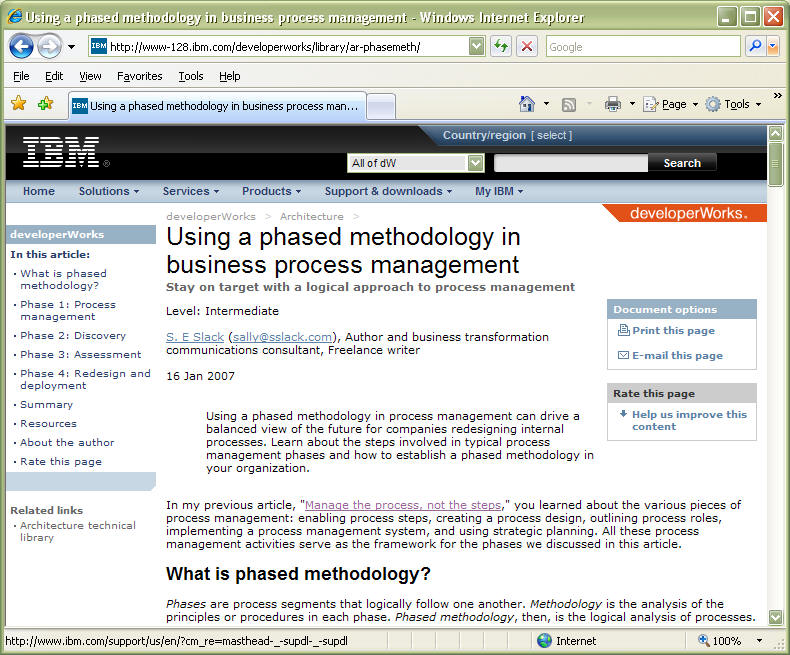
Example of a site layout design I like—IBM Developer Works
Let's take a minute to examine exactly what it is I like about this site design layout.
- The topic displays with a large clear easy-to-read explanatory title heading which grabs the eye and declares the topic title. There is no missing this title, yet it doesn't appear to be oversized or out-of-place.
- The title heading contains a further explanatory by-line with a different appearance. There is enough information provided with these first two elements to determine whether the topic interests you or not, without the need to look or read any further if you don't wish to do so.
- The left column area contains the subject section titles for the document in a Table Of Contents (TOC) style. This provides a ready overview of the document, and is placed to allow for quick selection of the subject if desired. The style is visually appealing and easy to follow. I note however, that this TOC differs from the style of TOC displayed on other pages from the same site, as shown in the following illustration:
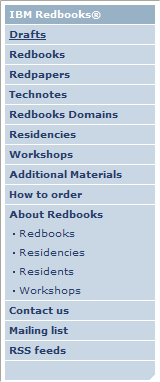
See Also
 Lotech Solutions' Tips,
Tricks, and Procedures
Lotech Solutions' Tips,
Tricks, and Procedures

 email webmaster
© Copyright Lotech Solutions. All rights reserved.